
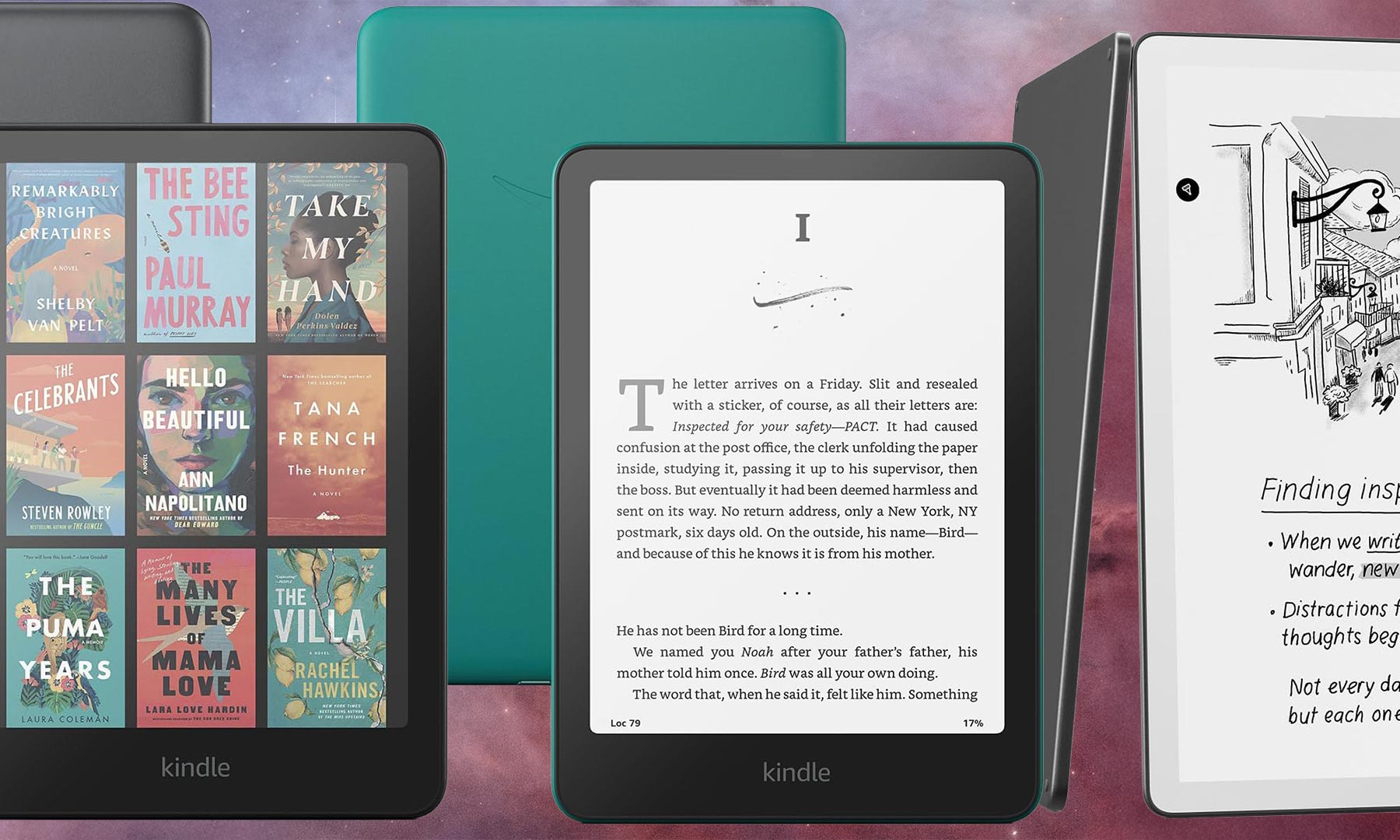
Using a Kindle may seem unnecessary in a world where reading books, articles, and any other text on a phone or tablet is easy. Carrying around a dedicated mono-tasking device will add weight to your load, and it’s another gadget to keep track of and charge. Yet Kindles remain popular because they only have one job and do it very well: let you carry and consume the stories that captivate you. A Kindle’s e-ink screen won’t reflect the sun when reading outdoors, unlike the reflective LCD displays used on phones and tablets. They get dramatically better battery life—measured in weeks, not hours—and every current Kindle supports audiobooks via Audible, too. Amazon’s lineup has never been better, and now includes its first-ever color e-ink model. If you’ve never owned a dedicated eReader, the best Kindles are the best place to start.
Best overall: Kindle Paperwhite (2024)
Best for note-taking: Kindle Scribe (2025)
Best for kids: Kindle Paperwhite Kids (2024)
Best color display: Kindle Colorsoft
Best budget: Kindle (2024)
How we chose the best Kindles for any budget
Our Kindle recommendations are based on a mix of research and hands-on testing, factoring in battery life, screen size, durability, storage capacity, and extra features. Amazon overhauled its entire Kindle lineup in 2024 and 2025, so every model in the current lineup is new hardware. The entry-level Kindle delivers a sharper display and faster page turns at $109.99. The Paperwhite now has a larger 7-inch screen. Amazon launched its first-ever color eReader, the Kindle Colorsoft. And the Kindle Scribe received its most significant redesign yet, becoming dramatically thinner and gaining AI-powered features. Our tests confirm the current slate of Amazon hardware is the best it has ever been. We also suggest checking out our story on the best eReaders to see how the full landscape looks.
The best Kindles: Reviews & Recommendations
If you’re looking for the best way to take advantage of the Kindle Books store, you should first decide what matters most to you—screen size, color capability, interactive features, or price—and go from there. Our recommendations cover the full spectrum, from a full-featured 11-inch writing tablet to a compact sub-$110 reader that can fit in a jacket pocket.
Best overall: Kindle Paperwhite (2024)
Kindle Paperwhite (2024)
See It
Pros
Largest Paperwhite display ever at 7 inches
25% faster page turns than the previous model
Up to 12 weeks of battery life
IPX8 waterproof rating
Cons
No color display
Specs
Screen size:
7 inches
Storage:
16GB, 32GB (Signature Edition)
Battery life:
Up to 12 weeks
IP rating:
IPX8
The 2024 Kindle Paperwhite is the best version of Amazon’s best-selling eReader yet—and the improvements aren’t just incremental. The biggest change is the display: it now measures 7 inches, up from 6.8 inches on the previous model, and uses an oxide thin-film transistor for the highest contrast ratio of any Kindle Paperwhite to date. Text pops off the screen in a way that genuinely justifies the upgrade. Page turns are 25% faster than the previous generation, which makes a noticeable difference when you’re deep in a novel and turning pages rapidly.
The Paperwhite remains waterproof with an IPX8 rating, meaning it can handle a dunking in up to two meters of fresh water for 60 minutes—a spec that matters more than it might seem for reading poolside or in the bath. Battery life is rated at up to 12 weeks under Amazon’s standard conditions (brightness at 13, wireless off, 30 minutes of reading per day). Real-world battery life will be shorter if you listen to audiobooks or use the device more heavily, but you’ll still go a long stretch between charges.
There are two versions of the Paperwhite worth knowing about. The standard model ($159.99) gives you 16GB of storage and a USB-C port. The Signature Edition ($199.99) bumps storage to 32GB, adds wireless charging, and includes an ambient light sensor that automatically adjusts brightness based on your surroundings. For most people, the standard model is the right call. If you read a lot of audiobooks stored locally or want wireless charging, spend the extra $40 for the Signature Edition.
The 300ppi display delivers sharp, clear text with no glare to fight on bright days. The front light uses 17 LEDs and supports warm-tone adjustment, which is useful for evening reading sessions. At 7.2 ounces, the Paperwhite is light enough to hold one-handed for hours. The only meaningful knock is that it doesn’t have a color display—that’s the Colorsoft’s job. But for pure reading, the Kindle Paperwhite (2024) is still the one to beat at its price.
Best for note-taking: Kindle Scribe (2025)
Kindle Scribe (2025)
See It
Pros
Largest Kindle display at 11 inches
Ultra-thin at 5.4mm and light at 400g
AI-powered search and note summarization
Google Drive and OneDrive document sync
Cons
Not waterproof
Expensive
Specs
Screen size:
11 inches
Storage:
32GB, 64GB
Battery life:
Weeks per charge
IP rating:
None
The 2025 Kindle Scribe is the device that early adopters of the original model were waiting for. Amazon went back to the drawing board on the design: it’s now just 5.4mm thin (roughly the thickness of a pencil) and weighs 400 grams, making it one of the slimmest large-screen writing tablets on the market. The display grew from 10.2 to 11 inches—proportionally matching a standard sheet of paper—and the new quad-core processor makes writing and page turns 40% faster than the previous generation. Handwriting on the Scribe now feels genuinely natural.
What separates this generation from its predecessors is the software. The 2025 Scribe includes AI-powered search that works across all your notebooks, letting you pull up a note by describing what’s in it rather than remembering exactly where you put it. There’s also an AI summarization feature that can condense a notebook’s contents into key takeaways. For people who use the Scribe as a professional tool—marking up documents, taking meeting notes, drafting ideas—these features add real value. Google Drive and OneDrive integration means you can pull documents directly from the cloud rather than manually transferring files.
The Scribe comes in two flavors: with or without a front light. The version with a front light ($499.99 for 32GB, $549.99 for 64GB) is the one most people will want, as it makes the device usable in any lighting condition. The no-front-light model ($429.99, 16GB) is for purists who want the closest possible approximation to writing on paper in a brightly lit room. For most buyers, the front-lit model is the easy choice.
The tradeoffs are real. At $499.99, this is a significant investment. It still lacks waterproofing, which is a notable omission at this price. And at 400 grams, it’s not a device you’ll comfortably hold in one hand for long reading sessions—it’s more of a lap or desk device. But if your goal is a large-screen eReader that doubles as a capable digital notebook with cloud document support and AI tools baked in, the 2025 Kindle Scribe delivers in a way no previous version could.
Best for kids: Kindle Paperwhite Kids (2024)
Kindle Paperwhite Kids (2024)
See It
Pros
Same 7-inch hardware as the adult Kindle Paperwhite
Two-year no-questions-asked warranty
Six months of Amazon Kids+ included
No ads, ever
Cons
Pricey for a child’s gadget
No color display
Specs
Screen size:
7 inches
Storage:
16GB
Battery life:
Up to 12 weeks
IP rating:
IPX8
The Kindle Paperwhite Kids is one of the rare digital devices designed for children that’s actually worth buying. Its core hardware is the same as the adult Kindle Paperwhite—that means a 7-inch display, IPX8 waterproofing, 16GB of storage, and up to 12 weeks of battery life—but it adds a package of kid-focused features that make it meaningfully different. The most practical is the two-year no-questions-asked warranty, which covers accidental damage. Kids drop things. This warranty means you won’t have to worry about it. The device is also waterproof, which matters far more for a child’s device than an adult’s—think splash pads, bathtubs, and juice spills.
The Kindle Paperwhite Kids is completely ad-free right out of the box. Standard Kindles show lock screen ads unless you pay to remove them; this model never does. For kids, that means opening the device leads directly to books and nothing else. It bundles six months of Amazon Kids+, which gives access to thousands of age-appropriate books and audiobooks during that period. The subscription normally runs $4.99 per month, so that included half-year has real monetary value. After the trial ends, you’ll need to pay for it or build a library of purchased titles. Parents interested in other screen-time options for kids should also consider our tablet roundup.
At $179.99, the Kindle Paperwhite Kids is pricier than the adult standard Paperwhite, but the extras—the warranty, the bundle, the case—justify most of that difference. The lack of a color screen is the one genuine weakness; picture-heavy books and illustrated stories lose some appeal on an e-ink display. But for chapter books and text-heavy reading, the Kindle Paperwhite Kids is the right device for building a reading habit.
Best color display: Kindle Colorsoft
Kindle Colorsoft
See It
Pros
First Kindle with a color E Ink display
Wireless charging and auto-adjusting brightness
IPX8 waterproof rating
32GB storage with no lock screen ads
Cons
Expensive at $279.99
Shorter battery life than the Paperwhite
Specs
Screen size:
7 inches
Storage:
32GB
Battery life:
Up to 8 weeks
IP rating:
IPX8
The Kindle Colorsoft is Amazon’s first Kindle with a color E Ink display, and it delivers on the promise. The 7-inch screen uses a custom oxide backplane with nitride LEDs in the light guide, which enhances color saturation without washing out detail—the key weakness of earlier color E Ink screens from other manufacturers. Text is just as sharp and readable as on a standard Kindle, since black-and-white resolution is still 300ppi. Color resolution is 150ppi, which is sufficient for book covers, magazine spreads, illustrated titles, and graphic novels. You can choose between standard and vivid color modes depending on your preference.
The Colorsoft is a Signature Edition only, which means it includes everything from the top-tier Paperwhite and then some: wireless charging, an ambient light sensor that automatically adjusts screen brightness, 32GB of storage, and no lock screen ads. It shares the same IPX8 waterproof rating as the Paperwhite and has the same 7-inch screen footprint, so they’re comparable in size and weight. Battery life is rated at up to eight weeks—shorter than the Paperwhite’s 12 weeks, which is the cost of driving a color display.
At $279.99, the Colorsoft costs $120 more than the standard Paperwhite. Whether that’s worth it depends entirely on what you read. For text-only fiction and nonfiction, the color display adds nothing—save your money and buy the Paperwhite. But if your library includes illustrated books, graphic novels, cookbooks, travel guides, manga, or magazines, the Colorsoft transforms how those titles look on an e-ink screen. It’s also the best Kindle for readers who want the richest, most complete version of book covers and the visual aspects of their library. The Kindle Colorsoft is a genuinely new category of device for Amazon, and the first attempt is a good one.
Best budget: Kindle (2024)
Kindle (2024)
See It
Pros
Lowest price in the lineup at $109.99
30% brighter display than the previous model
16GB of storage
Six weeks of battery life
Cons
Not waterproof
Smaller 6-inch display
Specs
Screen size:
6 inches
Storage:
16GB
Battery life:
Up to 6 weeks
IP rating:
None
The 2024 entry-level Kindle is the best sub-$110 eReader you can buy. Amazon made meaningful improvements across the board: the display is 30% brighter than the previous generation and still delivers a sharp 300ppi image. Page turns are faster. The USB-C port replaces the old micro-USB. And like the Paperwhite, it’s the smallest and lightest device in the lineup, weighing in at just under 5 ounces. It now comes in a Matcha green color option alongside black, which is a small but welcome bit of personality for a device that previously came only in black and denim.
The honest tradeoffs are straightforward. The screen is six inches—one inch smaller than the Paperwhite. That difference is subtle when you’re reading at default text sizes, but it becomes more noticeable if you prefer larger fonts or have any difficulty reading small text. The entry-level Kindle is also not waterproof, which is the most significant omission in the lineup. If you read near a pool, in the bath, or somewhere else where a drop is possible, you’ll want to move up to the Paperwhite. Battery life is rated at up to six weeks—solid, but shorter than the Paperwhite’s 12 weeks.
Storage is 16GB across the board, which is enough for thousands of standard ebooks and a reasonable collection of audiobooks. The entry-level Kindle has no higher-storage option, which is worth noting if your library includes a lot of illustrated books or downloaded audio. The ad-supported version ($109.99) shows lock-screen ads; paying $20 more removes them. That’s worth it for most buyers—the lock screen ads aren’t intrusive, but they’re also not nothing.
If you’ve never tried an eReader before, want to gift one without spending much, or just need a lightweight reading companion for travel or commuting, the 2024 Kindle is the right starting point.
What to consider when shopping for the best Kindles
Screen size
A Kindle’s screen size determines both the device’s physical footprint and how comfortable it is to read on. Larger screens let you increase text size without requiring you to turn pages as frequently—a real quality-of-life improvement for readers who prefer bigger fonts. The current Kindle lineup covers three sizes: 6 inches (Kindle), 7 inches (Paperwhite, Colorsoft, Paperwhite Kids), and 11 inches (Scribe). The jump from 6 to 7 inches is more meaningful than it sounds—text at a given font size looks noticeably less cramped on the larger display. The 11-inch Scribe is in a category of its own, designed as much for writing and annotation as for reading.
Battery life
Amazon measures Kindle battery life in weeks, which requires some context. The figures assume brightness set to 13, wireless turned off, and 30 minutes of reading per day. Under those conditions: the Kindle (2024) lasts up to 6 weeks, the Colorsoft up to 8 weeks, and the Paperwhite and Paperwhite Kids up to 12 weeks. Real-world battery will be lower if you listen to audiobooks, stream books over Wi-Fi frequently, or read with high brightness. But even at half the rated figures, every Kindle lasts far longer between charges than a phone or tablet.
Storage capacity
Standard Kindle ebook files are small—a 900-page novel typically runs under 5MB—so even 16GB can hold thousands of books. The calculus changes with image-heavy books and audiobooks. Samin Nosrat’s Salt, Fat, Acid, Heat: Mastering the Elements of Good Cooking runs 132 megabytes as a Kindle file, and Audible audiobooks typically range from 100MB to 500MB depending on length. If your library is text-heavy, 16GB is more than enough. If you read illustrated books, cookbooks, or manga, or download a lot of audiobooks for offline listening, opt for a Scribe (32GB or 64GB) or the Colorsoft (32GB). You can also check the file size of any ebook on its Amazon product page before buying, which is a useful way to estimate your storage needs.
Color vs. black-and-white
The Kindle Colorsoft introduced something new to Amazon’s lineup: a color E Ink display. It’s the right choice for anyone whose library includes illustrated titles, graphic novels, manga, cookbooks, magazines, or visual reference books. For readers who stick primarily to fiction and text-heavy nonfiction, a standard black-and-white Kindle delivers identical reading quality at a lower price. Color E Ink uses more power than standard E Ink, which is why the Colorsoft’s battery life is shorter than the Paperwhite’s. Color resolution (150ppi) is also lower than the black-and-white resolution (300ppi), though this is generally not noticeable in typical reading.
Durability
Most Kindles in the current lineup carry an IPX8 rating, meaning they can be submerged in up to two meters of fresh water for up to 60 minutes without damage. The Paperwhite, Paperwhite Kids, and Colorsoft are all IPX8 rated. The entry-level Kindle and the Scribe are not waterproof. If you read at the beach, near a pool, or in the bath, waterproofing should be near the top of your criteria list.
FAQs
Q: What generation Kindle should I buy?
Amazon refreshed its entire Kindle lineup in 2024 and 2025, so all currently available models are new hardware. There is no confusion about which generation to buy—every Kindle sold new today is current-generation.
Q: Is Kindle better than a phone for my eyes?
Yes. A color LCD display—the type of screen found on phones and tablets—emits more light and at a wider angle, which can contribute to eye fatigue during long reading sessions. A Kindle’s e-ink display is reflective rather than emissive, meaning it bounces light like a printed page rather than shining it directly at your eyes. Kindles also support warm-tone adjustment, which shifts the screen toward amber and makes them easier to use in low light or at night.
Q: Is it OK to read a Kindle in the dark?
Yes. Every current Kindle model has a built-in front light. You don’t need to crank the brightness high—a low setting is usually comfortable enough for dark rooms. The front light illuminates the screen from the front rather than backlighting it from behind, which is gentler on the eyes than a phone or tablet display.
Q: Does a Kindle have blue light?
Yes, Kindle front lights emit some blue light, though typically less than a phone or tablet. If you’re concerned, all Kindles let you shift the display toward a warmer amber tone, which reduces blue light output significantly. You can also pick up a pair of blue light glasses if you prefer that approach, though the warm-tone feature built into the Kindle is usually sufficient.
Q: How long do Kindles last?
A well-cared-for Kindle should last five or more years of regular use. E-ink displays degrade more slowly than LCD or OLED panels, and Kindles have no moving parts. The battery will hold less charge over time, as with any rechargeable device, but replacement batteries are available and the device itself tends to outlast expectations.
Q: How much do Kindles cost?
The current Kindle lineup ranges from $109.99 for the entry-level Kindle to $499.99 and up for the Kindle Scribe. The Kindle Paperwhite starts at $159.99, the Kindle Colorsoft costs $279.99, and the Kindle Paperwhite Kids is $179.99.
Q: Does the Kindle Oasis still exist?
No. Amazon discontinued the Kindle Oasis in late 2023. It was the last Kindle with physical page-turn buttons. There is currently no Kindle model with hardware page-turn buttons. For readers who loved the Oasis’s ergonomic design, the Kindle Paperwhite Signature Edition is the closest current alternative.
Q: How do I buy books for the Kindle?
Every Kindle is Wi-Fi enabled and can access the Kindle Store directly from the device. You can also purchase books on Amazon’s website and they’ll automatically sync to your Kindle. Amazon’s Kindle Unlimited subscription ($11.99/month) gives unlimited access to over four million titles, which is a cost-effective option for heavy readers.
Q: Can a Kindle play audiobooks?
Yes. Every current Kindle model supports Audible audiobooks via Bluetooth. You can pair wireless headphones or a Bluetooth speaker and listen directly from the device. Kindles also support Whispersync for Voice, which lets you switch seamlessly between reading a book and listening to its audiobook version, picking up exactly where you left off. See our guide to the best audiobook apps for more options beyond Audible.
Final thoughts on choosing the best Kindle for you
Best overall: Kindle Paperwhite (2024)
Best for note-taking: Kindle Scribe (2025)
Best for kids: Kindle Paperwhite Kids (2024)
Best color display: Kindle Colorsoft
Best budget: Kindle (2024)
The Kindle’s continued dominance in the eReader space reflects Amazon’s consistent investment in genuinely useful upgrades. The 2024 and 2025 lineup represents the biggest hardware refresh in years: a larger Paperwhite display, the first-ever color Kindle, a dramatically redesigned Scribe with AI tools, and a sharper, brighter entry-level model. Amazon’s book ecosystem makes building a digital library straightforward, and the ability to carry thousands of titles—plus an audiobook library—on a device that weighs less than half a pound is a genuine advantage over a shelf full of paperbacks. In a world of apps competing for attention, the Kindle remains one of the few devices engineered purely for reading. That focus is exactly what makes it worth carrying. For a broader look at the category, see our full roundup of the best eReaders.
The post The best Kindles appeared first on Popular Science.
